Tuesday, July 6, 2010

Thing 55 Update: Bing

A recent post on Resource Shelf offers an update on new features in Bing. Here are a few the article mentions:
  • Updated iPhone app
  • More entertainment information, including song lyrics and full-length song streaming (one time, then 30 second previews)
  • More automobile data and financial data
  • Flight pricing
There is much more in the article--definitely worth the time to read and explore. You can read Bing Bang Boom! Bing Announces New and Enhanced Features and Tools on the Resource Shelf blog, another source worth subscribing to in your RSS feed reader.

Tuesday, June 1, 2010

Thing 58. Chat Reference: AskMN

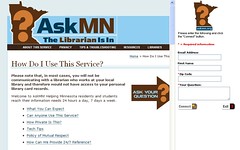
Sometimes a Google search or a ChaCha inquiry simply does not provide the in-depth, quality information that you need. Or maybe you just don’t know how to formulate an effective search strategy and could use a little professional help. And then, sometimes, it is Sunday evening, the library is closed, the assignment is due…. AskMN is there to help. Anyone with a reference question or doing research, who is comfortable with instant messaging and chat, will love the 24/7 services of AskMN. And if you are not familiar with using chat, this is an easy introduction.

AskMN is an online, interactive chat service that allows you to chat with a librarian in real time. The librarian is available to answer your questions and to direct you to various websites. This information and research help is available to Minnesota residents and students 24 hours a day, 7 days a week. When Minnesota librarians are not available, there are librarians in other parts of the worldwide network to come to your aid.

The process is very quick and easy. You provide your email address, first name, zip code and your question. When you “Connect” a chat box opens and you are able to chat directly with a librarian. Further chat, co-browsing, referral to sites -- it is all right there on your screen. Sessions generally last from 5-20 minutes. The librarian will be able to refer you to print and local resources and to Internet sites, as well as subject specialists who may not be available during the live session.
When all is done, you will be sent a transcript of your session so you can easily return to sites or resources that came up during the session. It is pretty cool -- and very useful.

AskMN also welcomes classes. Teachers and school librarians can use a special form to alert AskMN when you will be visiting, your topic/assignment, and how to conduct a class visit. AskMN staff will be prepared for the demand and will make resources available on your students’ subject matter so that all students collect similar information. This is very cool.

AskMN is brought to us by Minitex and participating Minnesota libraries (currently 6 public libraries and 7 academic libraries). Try it out  -- you’ll find it is an amazing service.

By Ruth Solie, Northern Lights Library Network


Thing 57. ChaCha: Mobile Answer Service

Almost all of us have cell phones and we all have questions -- important questions, trivial questions, situational questions, directional questions, bar bets, and questions that result from idle speculation. Often we need information quickly, and while we’re on the go. For a quick and easy way to get answers to these questions, ask ChaCha!

ChaCha is like having a smart friend you can call or text for answers on your cell phone anytime for free! ChaCha works with virtually every provider and allows people with any mobile phone device - from basic flip phones to advanced smart phones - to ask any question in conversational English and receive an accurate answer as a text message in just a few minutes.

What’s your question?
 Simply text your question to 242242 (spells ‘ChaCha’) or call 1-800-2ChaCha (800-224-2242) from your mobile phone to ask any question.

You will get an immediate response from ChaCha that your question is being processed -- and there will be an ad (which is what makes ChaCha free to you). Within a few minutes -- but often less than 30 seconds -- you will receive an answer to your question as a text message.

Behind ChaCha answers are Human Guides (over 50,000 of them) who actually respond to your query. And behind those Human Guides are librarians when questions get really tough. Questions/answers are retained in a ChaCha database which you can access via their website.  ChaCha reaches over 15 million unique users per month who are primarily teens and young adults, but many of us older folks rely on it as well.

Try it! It is much easier to use ChaCha than to read about it, so simply call 800-224-2242 or send a text to 242242 with your questions from your mobile phone and take ChaCha for a spin!

If you are interested, there is more you can do at the website: you can become a Human Guide (for pay), you can follow @chacha on Twitter, or find them on Facebook, explore their Q/A database, or look at their business model, but the best part of ChaCha is the simplicity, the immediacy, and the convenience of having questions answered on the go, for free!
 
by Ruth Solie, Northern Lights Library Network

Tuesday, May 4, 2010

Thing 56. LinkedIn

 Are you LinkedIn? Maybe you have checked it out? Well, if you haven't looked at LinkedIn (LI) lately, you may want to revisit the largest business networking site on the web. Initially known for its use in connecting employers with potential employees and vice versa, LI has become much more. Creating a free LI profile (for yourself or your library) opens a door to connect with others in your field who are already LinkedIn. Once connected, the possibilities for sharing common ideas, problems  and solutions are just a post away.

Say you are having difficulty using a MS Excel feature and just want to ask a question. Write up the question and put it out there. Within hours you will hear from people skilled with MS Excel offering directions on how to use the feature. You may receive 5 or 50 responses, and you may have to sort a bit to find the one that speaks to you at your level, yet the chances are good you will get the help needed to resolve the problem. 


Another really useful tool in LI allows you to seek out, join or even create a group. A search of existing groups related to library professionals produced 127 results, library networking groups found 47, while library non-profit groups totaled 57. Being part of a group allows you to gather input, share input, and participate in activities related to group involvement. Example -  your library is conducting some research on the most current trends in children's programming. You can post a survey to your group  requesting input and gather programming ideas from around the globe.

LI is a great place for you to market yourself and your unique set of skills and experiences. Building group involvement expands your own knowledge base on issues and trends, and offers the ability to collaborate, share and grow. LI is also gaining popularity as a social marketing tool for more non-traditional groups that may not consider themselves a business.

Maybe it's time to get LinkedIn and powered up! Visit or revisit http://www.linkedin.com/ and check out all of the potential.

By Lynn, Stern, SAMMIE

Things 55. Google OR Bing - Which Thing?

Are you “gaga" over Google  or "bonkers" for Bing? Most of us are familiar with the many facets of Google, but it's time to take a closer look at Bing. Since its launch in 2009, Bing has offered an alternative to Google. While similar to Google, Bing offers a variety of unique features.

Bing takes a simple approach while inviting you in to search the web, news, travel, and shopping. You can also look for videos, search for images or maps, look up local businesses or begin with a visual search. Some key aspects to Bing include ease in exploring "how" Bing works as a search and decision tool.

Bing also provides toolbox access for webmasters, businesses and advertisers – including search engine optimization tips and advertising opportunities to make money on your site. Bing also promotes community connections with the use of forums and blogs and has a rewards program for users, such as “cashback” options while shopping. So far it sounds like Bing and Google do basically the same thing, yet each application has distinctly different offering

Of the many Bing features, below is a highlight of just a few that may be useful to you or your patrons.

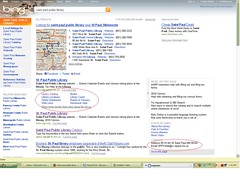
Check out the ability to hover to the right of search results to get a quick snapshot of the item before actually looking at it. Example: search for your library, then hover to the right of the result. A box will pop up with basic information. Perhaps a patron is simply trying to locate your address and phone number - there it is! This tool can be very useful in locating what you are seeking with less search time. It can also be a helpful patron tool in deciding if they are even starting with the right search topic.


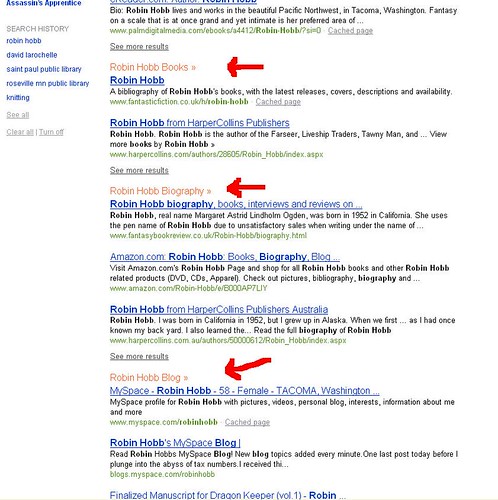
Searching is conveniently topic-layered to make choice easier. Example: looking for information on an author? Pick your favorite and notice as you type in the name you will see that the results begin to organize in specific categories, i.e. biography, books, book titles, etc. If you are just looking for books or a specific book listed, there it is!

Want to know what or who is hot or not? What's the trend of a book? Choose "Explore" on the Bing search page, choose xRank, click and type in the topic or person to check on popularity. Not only do you get a graph, but some additional general information as well.

No Twitter for you? Bing can still keep you up-to-date on the latest tweets - check it out at www.bing.com/twitter.

Not sure what that "thingy" you are looking for is called? Bing has visual search capability. Example: you see a cool cat-grooming tool while visiting a friend. You can look up cat grooming tools, begin an image search, and within minutes find out it's called a "cat slicker brush with combs."

Bing has many other functions worth checking out. Once you begin exploring you can find a variety of applications that can enhance your search experience. There are many tools that can be quite helpful to patrons as well. It is clear that Google and Bing each bring something different to the screen. If you’re curious to see a side-by-side comparison of the two, visit this site.


By Lynn Stern, SAMMIE

Monday, April 5, 2010

Thing 54. Hyperlocal Sites

In this thing, we’re exploring the not-so-new idea known now as hyperlocal websites. “Not-so-new” in the sense that what many of these sites are doing is providing that local (town, city, neighborhood, or even block) information source that many small town daily or weekly newspapers have always provided. As many of these newspapers are beginning to disappear and larger newspapers are dropping most local coverage, this type of local news coverage is moving to the web. The field of companies offering this service is growing and have become desirable to some larger media companies such as MSNBC, AOL, and so on. To give you a sense of the variety of sites out there, let’s take a look at a couple of sites: EveryBlock and Patch.

EveryBlock, owned by msnbc www.msnbc.com, takes a granular approach to reporting local news. Rather than just reporting news for entire city, say New York City, they offer news feeds for every block in 16 cities, which as of today includes:
By entering a street address or neighborhood name, you can find news coverage, public records, and other content that is either from that area or in the same geographic area.  EveryBlock states that it is trying to answer the question, “What’s happening in my neighborhood?” The company does the gathering of this information and presents it to the end user. EveryBlock focuses on four categories of local news:
  • Civic information – defined as public records information, including permits, crimes, restaurant inspections, etc. EveryBlock has established relationships with local governments to make this information more readily available.
  • News articles and blog entries – defined as information from major newspapers, local TV and radio, community weeklies, local blogs, and other local publications. EveryBlock then does the work of geographically classifying these articles.
  • Fun – defined as coming from diverse places on the web, such as Flickr www.flickr.com, Yelp www.yelp.com, Craigslist www.craigslist.org and so on.
  • Announcements – defined as news, classifieds, and upcoming events. This category even allows for the posting of announcements.
Creating an EveryBlock account
Each EveryBlock site allows users to register for “extra features.” To register, go to any of the 16 sites and click on Register in the upper right corner and follow these steps:


  1. Type in your email address. A message will be sent to your email to verify that the email address you entered was indeed valid.  Click on the link in your email and go to step
  2. Set a password. Type in a password for your account (retype it for security purposes) and Voila! You’ve created an account.
Once you’ve created an account, you can set your preferences to what types of information you want to see on your page, what neighborhood(s) you’d like to be emailed about or would like to have set up as a saved place, and post announcements, alerts, etc. There is also an iPhone app that can be downloaded as well so that you can take your news on the go.
    Patch www.patch.com is a site that really does seem to take that small-town newspaper idea and run with it. Rather than focusing on a block or neighborhood in a city like EveryBlock, Patch focuses on an entire small town or city. Currently, Patch has cities in 5 states (California, Connecticut, Massachusetts, New Jersey, and New York) and as of today, 44 towns and cities. 
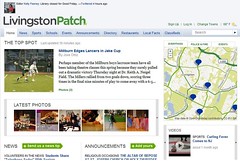
    Each page has the same basic layout, which includes sections such as news, announcements, events, and a section called essential which includes things like videos, calls for volunteers, and listings for local organizations. Here is an example of a Patch site for Livingston, NJ.

    Other sites of hyperlocal sites of interest:
    Will we soon rely on these hyperlocal sites to get all our news and information? Time will tell!

    By Michael Scott, Assistant Director, SELCO/SELS
    Newspaper Image: A Stack of Newspapers. DRB62 Photostream

    Thing 53. Location-Based Social Networks


    One of the newest and hottest 2.0 technologies is location-based social networks. These technologies use GPS to broadcast your location and/or other content from your mobile device, known as "checking in." Most of these services are free and available for a variety of mobile devices, including the iPhone, Blackberry, and Android. So let's dive in and take a look at two of the many networks out there: foursquare and brightkite.

    foursquare is one of the most popular of the location-based social networks. As it describes itself, “foursquare is a cross between a friend-finder, a social city-guide, and a game that rewards you for doing interesting things.” Foursquare can be used anywhere in the world and while it doesn’t have every city or location, it does give you the option to add a location.

    Setting up a foursquare account

    To begin, click on the Join Now button. You will be asked to fill in just a brief amount of information, including your name, location (i.e. a city & state), and your email address. Some information is optional (such as your phone number) but most of the information is required. You have the option of also adding a photo, much like Twitter and Facebook. By the way, you can link your foursquare account to both of these social networking technologies as well. And, just like Twitter and Facebook, you can search for your friends and add them into your foursquare so they can be notified when you and where you are checking-in. The key thing to know about foursquare is that it is currently available only on your mobile device; check-in can’t be done from the foursquare website (with the exception of using their mobile website http://foursquare.com/mobile/ which is obviously built for a mobile phone.) There are apps available for the following phones:
    • iPhone
    • Blackberry
    • Android
    • Palm Pre
    There is a mobile website available as well if you don’t have one of the listed phones or you can send a text to 50500. Text or SMS check-ins are only available in the U.S.

    Checking-in, earning points and badges, and “The Mayor”
    Telling foursquare where you are is known as “checking-in.” When you check-in on foursquare, the program notifies your friends. Even if you don’t have a smartphone, you can check in like this: 
    @ SELCO ! Attending CE course

    Once you check-in, you will earn points:
    • 5 points for your first time checking-in at a venue
    • 5 points for adding a new venue
    • 1 point per check-in, increasing by 1 point with each check-in (i.e. first check-in of the day is 1, second check-in of the day is 2 points, etc.)
    Right now, only points are accumulated. foursquare is still experimenting with what the points translate into. They would like to know if you have ideas about the points.

    When checking-in, you have the options of adding a “tip” and “to-dos.” A tip is something that you want to share with your friends about a place. It might be as simple as recommending an item from a restaurants menu to letting them know about an especially helpful staff member at a store. In turn, you’ll be able to see what tips your friends have left for a location when you check-in. To-dos are little notes you leave for yourself at a location, like maybe trying another menu item or where something might be located within in store.

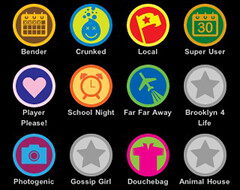
     And, just like other Web 2.0 applications, you have the option to “tag” a venue. Tags can be anything and become important in earning badges. “Badges” are extra rewards that you can earn when you check-in at an interesting place and are tied to venue tags. Essentially, adding a tag to your favorite place can help unlock badges. 

    To become Mayor of a location, two things are required. One, you must have a photo on your foursquare profile. Two, you have to have visited a location more than anyone else. The state of being “mayor” can be short-lived especially with a large number of friends. But, unlike the points and badges, being mayor MAY actually get you some free stuff. Many businesses have tapped into foursquare and will offer“mayor” things like free drinks, hotel stays, ice cream, you name it. Think of this like those loyalty rewards cards you get from gas stations or grocery stores.

    Brightkite  says this about itself: “Brightkite is a simple way to keep up with friends and places. We created a product that lets you instantly see what's going on with the people who matter most to you, your friends. So check out what they're up to, meet new friends along the way and get out and enjoy your neighborhoods.”

    The application can be accessed several ways:
    Setting up a Brightkite account 
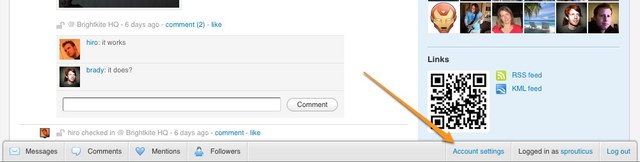
    Just as with foursquare, there is a large button right on the front page of the website that allows you to set up an account, including the ability to connect with Facebook. Sign up is as easy as your email address, picking a username and password, and answering a simple verification question. Before you can really proceed, you will need to verify your email address via the email message the application sends you. Once this is done, you can add more information about yourself by clicking on Account settings. Note that this is at the very bottom of the screen on a special taskbar that is very small. 


    Checking in and Posting
    If you’ve used Twitter, you can use Brightkite. In fact, if you check-in and post on the website, your Brightkite page looks an awful lot like your Twitter page, including using a very similar layout. You can set this page of post to show only your posts, your friends posts, or everybody’s posts; limit the area you’d like to see post from (from 20 m to 100 km or everywhere); and limit to either check-ins, posts, photos, or any combination of the three.

    To check-in on the web, click on the Check In button:


    To post notes and photos on the web, first click on Post:


    Then, click either begin typing in your post or click on the photo button to post a photo:


    By the way, to check in via text message, use the convention:

    @ SELCO ! Attending CE course

    You can also easily share your posts, check-ins, etc. on Twitter and Facebook.

    It doesn’t seem that there are any badges or points to earn in Brightkite, just the ability to connect with your friends and others.

    Brightkite Support
    Brightkite does have an extensive knowledge base of frequently asked questions. This is the best place to start in setting up and using your Brightkite account. For a great example from their support page, click here to see how to check-in and post a note or a photo at the same time.

    Kiteups
    A kiteup is simply a meetup of Brightkite users, thus making this application more than just a virtual social network. If given a few weeks notice, Brightkite can provide its users with a public placemark for the event and a special “kiteup” kit with goodies that you can give away to your attendees. For complete instructions of how to set up a kiteup, click here.

    The “Creepy” Factor
    OK, so if you are getting that uneasy feeling about these applications, i.e. the “creepy” factor, don’t worry, you’re in good company. Basically, the words of advice that folks have are that if you are feeling creeped out by revealing where you are, just don’t do it. However, here’s what according to Aliza Sherman, host of site The Digital Marketer:
    Yeah, location-based social networks are a little creepy. I mean you're basically checking in when you arrive someplace to let your network contacts or the public at large know where you are and what you're doing. So if you're creeped out about revealing your location, maybe you shouldn't do it. But don't let that turn you away. You may be surprised by what these networks can do for you.
    For her full article, click here.

    For another interesting article on the subject, check out Sarah Perez’s article on ReadWriteWeb Location-Based Social Networks: Delightful, Dangerous or Somewhere in Between?

    Other location-based social networks:
    It's up to you whether or not you want to have these location-based sites let others know where you are. Interest and activity on the sites tends to be friend-related--if your friends play the games, you are more likely to play along. Let us know what you think in the comments!

    By Michael Scott, Assistant Director, SELCO/SELS